Laravel .env Changes Not Working? Fix the config:cache Trap
Why config:cache stops Laravel from reading .env, why env() returns null outside config files, and the right command order after every deploy.
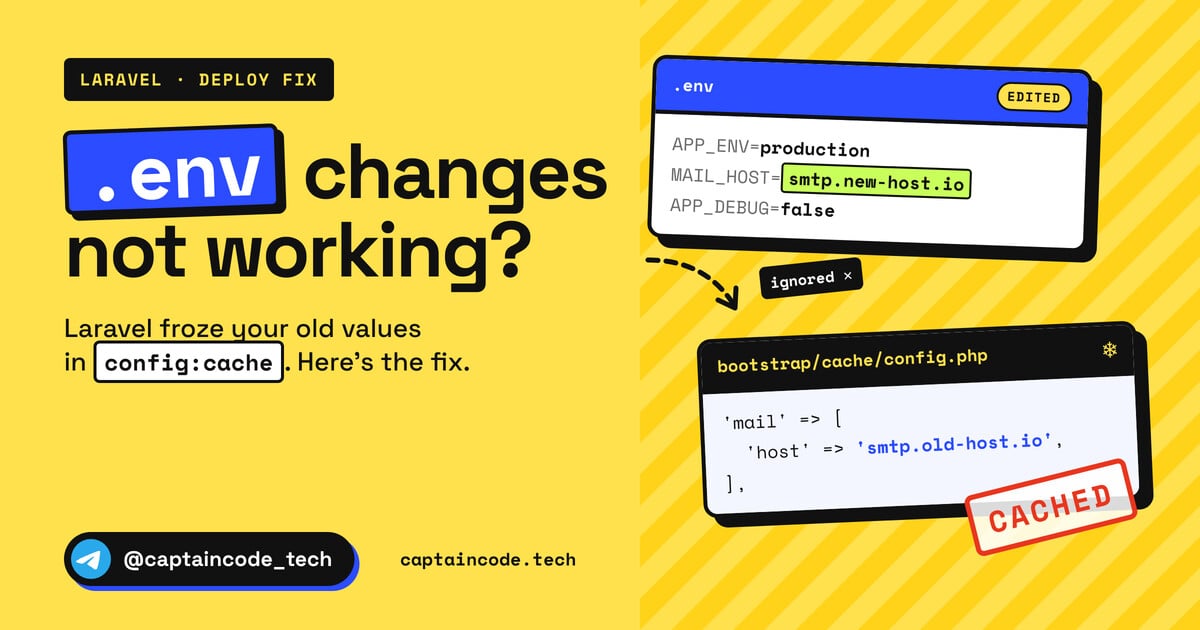
You change a value in your server's .env, maybe MAIL_HOST, APP_URL or an API key, save the file and refresh the page. Nothing changed. You open the file again and the new value is right there, but the app keeps using the old one. Or worse, some piece of code that reads a value with env() suddenly gets null.
If your Laravel .env changes are not working, the config cache is almost always involved. It isn't a bug, it's Laravel doing exactly what it was designed to do. In this guide we'll look at what config:cache actually does, why env() returns null outside config files once the config is cached, how to find out where the problem really is before you start clearing things, and where to look if it's still broken after config:clear.
The short answer
When php artisan config:cache (or php artisan optimize) runs, Laravel executes every file in config/*.php once and writes the result, using whatever .env contained at that moment, into bootstrap/cache/config.php. As long as that file exists, Laravel doesn't read .env at all.
So after every .env change on the server:
php artisan config:cache      # rebuild the cache with the new values
php artisan queue:restart     # if you run queue workers
sudo systemctl reload php8.3-fpm   # if OPcache uses validate_timestamps=0 (use your PHP version)
If you don't want a cache at all (for example locally), just run php artisan config:clear. The rest of this article explains why, and where you can still get stuck.
Why Laravel stops reading .env after config:cache
Normally, when Laravel boots, it loads .env with phpdotenv, then runs your config/*.php files, and every env('...') call in them picks up its value from the environment. That happens again for every request and every Artisan command.
config:cache skips that work. It builds the whole configuration once and stores the final result as a plain PHP array. The important part: there's no env() left in that file, only final values:
<?php return array (
  'app' =>
  array (
    'name' => 'Captain Code',
    'env' => 'production',
    'debug' => false,
    'url' => 'https://example.com',
    // ...
  ),
  'mail' =>
  array (
    'default' => 'smtp',
    // ...
  ),
);
(This is shortened, but the real file has exactly this shape: a var_export of the entire config.)
So the value of APP_DEBUG was baked in at the moment you built the cache. You can edit .env as much as you like, Laravel won't look at it because it no longer loads .env. The official Laravel docs say exactly that:
Once the configuration has been cached, your application's .env file will not be loaded by the framework during requests or Artisan commands; therefore, the env function will only return external, system level environment variables.
One detail from the framework source that many tutorials miss: the first thing config:cache does is call config:clear, and then it builds a fresh config. So you don't need a separate config:clear before config:cache. Running both doesn't hurt, it just isn't required.
Where env() works and where it returns null
This table sums up the whole story:
Where env('X') is called |
Without config cache | With config cache |
|---|---|---|
Inside config/*.php |
Read from .env |
Read once when the cache was built, then frozen in config.php |
| Controllers, services, models, Blade | Read from .env |
null (or your default), unless the variable is a real system environment variable |
| Artisan commands and Tinker | Read from .env |
Same as the row above |
| A running queue worker | Read when the worker started | Read when the worker started, unchanged until it restarts |
The rule is simple: only call env() inside config files, and use config() everywhere else.
// Bad: in a controller or Blade view
public function checkout()
{
    $key = env('STRIPE_KEY'); // null after config:cache
    return view('checkout', compact('key'));
}

// Good: config/services.php
'stripe' => [
    'key' => env('STRIPE_KEY'),
    'secret' => env('STRIPE_SECRET'),
],

// and in the controller
public function checkout()
{
    $key = config('services.stripe.key');
    return view('checkout', compact('key'));
}
Same for Blade: write {{ config('app.name') }} instead of {{ env('APP_NAME') }}.
A quick search finds the env() calls that are in the wrong place:
grep -rn "env(" app/ resources/views/ routes/
For every hit, add a key to one of your config files and read it with config().
Diagnose before you clear anything
Clearing every cache in sight without knowing what's wrong mostly wastes time. These commands tell you what's actually going on.
1. Is the config cache active at all?
php artisan about --only=cache
Next to Config you'll see either CACHED or NOT CACHED. If it's not cached and you still see the old value, the config cache isn't your problem, so skip to the "still broken" section below.
You can also check the file directly:
ls -la bootstrap/cache/config.php
2. What value does Laravel see right now?
php artisan about --only=environment
php artisan config:show mail
config:show prints the final values of a config file, the ones the app actually uses. If .env has the new value but this shows the old one, the cache is stale.
3. Read a specific value from inside the app
php artisan tinker --execute="dump(config('app.url'), env('APP_URL'))"
If the first one is correct and the second is null, everything is behaving normally: the cache is active and env() doesn't work outside config. Whatever code is getting null needs to switch to config().
Keep in mind these commands run through the CLI. If the CLI shows the right value but the website still shows the old one, the likely culprit is PHP-FPM and OPcache, covered below.
The right order after editing .env on the server
Copy this checklist and swap in your own project path, web server user and PHP version:
cd /var/www/your-app

# 1. Edit .env (as the user that owns the project)
nano .env

# 2. Build a fresh cache with the new values
#    (it runs config:clear first on its own)
php artisan config:cache

# 3. If you run queue workers, tell them to restart after their current job
php artisan queue:restart

# 4. If OPcache doesn't check timestamps (validate_timestamps=0), reload PHP-FPM
sudo systemctl reload php8.3-fpm

# 5. Final check
php artisan about --only=cache
php artisan config:show app
A few notes on that order:
- Don't reach for
optimize:clearevery time. Besides the config cache, it clears the route, view and event caches and also runscache:clear, which empties your application cache store (everything you saved withCache::). A simple.envchange doesn't need that. queue:restartrelies on the cache. According to the Laravel queue docs, the restart signal is stored in the cache, so your cache driver must be working. Workers exit after finishing their current job, and Supervisor (or another process manager) has to start them again.- On Horizon, use
php artisan horizon:terminateinstead ofqueue:restart. On Octane, runphp artisan octane:reload, because Octane boots the app once and keeps it in memory.
Still broken after config:cache? Check these
1. OPcache and PHP-FPM
bootstrap/cache/config.php is a PHP file, so OPcache caches it too. When a change becomes visible depends on your OPcache settings:
; usually /etc/php/8.3/fpm/conf.d/10-opcache.ini or php.ini
opcache.validate_timestamps=1
opcache.revalidate_freq=2
Those are PHP's own defaults: OPcache checks for changed files every couple of seconds, so changes show up quickly. Plenty of production servers set validate_timestamps=0 for speed, though. Then OPcache never checks on its own, and the old config.php keeps running until you reload PHP-FPM.
A common mistake is calling opcache_reset() from the CLI. The CLI's OPcache is separate from PHP-FPM's, so that does nothing for your website. Reloading the PHP-FPM service is the right fix.
2. Queue workers, Horizon or Octane that weren't restarted
Workers are long-running processes. They boot the app once when they start and keep the config in memory. If queued emails still go out through the old SMTP server, you almost certainly didn't restart the workers.
3. env() outside config files
If something gets null after a deploy but works fine locally, this is nearly always why. Locally you usually don't have a config cache, so env() works. On the server the cache is active and the same line returns null. The fix is the one above: move the value into a config file and read it with config().
4. A .env.production file you forgot about
Per the Laravel docs, if APP_ENV is provided externally (by the system or container environment, not inside .env itself) or a command runs with --env, Laravel first looks for .env.[APP_ENV], for example .env.production, and only falls back to .env if that file doesn't exist.
ls -la .env*
If there's an old .env.production sitting there, you're editing the wrong file.
5. Real system variables override .env
Laravel doesn't overwrite a variable that already exists in the real environment with the value from .env. So if APP_URL is set in the environment section of docker-compose.yml, in your PHP-FPM pool config (like env[APP_URL] = ...) or in your hosting panel, whatever you write in .env has no effect. Change it there as well, then rebuild the cache.
6. The cache was built by the wrong user
If you once ran config:cache as root, bootstrap/cache/config.php belongs to root, and later the deploy user or web server may not be able to replace it. Run Artisan as the user that owns the project:
sudo -u www-data php artisan config:cache
(www-data is common on Debian and Ubuntu. On panels like aaPanel the user is usually www.)
7. Your deploy script runs things in the wrong order
This one fails quietly: the deploy script runs php artisan optimize or config:cache first and copies the new .env onto the server afterwards. The result is a cache built from the old .env. The .env file always has to be in place before any cache command.
Automate it: a deploy script that keeps the order
The best way to stop this from happening again is to stop running these steps by hand. A simple example for a VPS:
#!/usr/bin/env bash
set -euo pipefail

cd /var/www/your-app

php artisan down
git pull --ff-only
composer install --no-dev --optimize-autoloader --no-interaction
php artisan migrate --force

# .env is already on the server, so the caches are built with the right values
php artisan optimize

php artisan queue:restart
sudo systemctl reload php8.3-fpm   # the deploy user needs sudo rights for this one command

php artisan up
php artisan optimize runs config:cache for you (plus the route cache, and in newer versions the event and view caches). If you also build front-end assets, npm ci && npm run build belongs before optimize; if that part gives you trouble, see the Laravel Vite manifest not found guide.
If you want this script to run on every push, we build it step by step in the automated Laravel deployment with GitHub Actions guide.
Also remember that a lot of post-deploy errors come from this same cache. For example, if you changed SESSION_DOMAIN or APP_URL and didn't rebuild the cache, you can end up chasing a 419 Page Expired error in Laravel and Livewire.
Still stuck? Ask Nyx
If you've checked all of this and still see the old value, give Nyx, Captain Code's AI assistant, the output of php artisan about, the relevant part of your config file and the line of code that calls env() or config(). Nyx is focused on Laravel and can walk through it with you step by step to find where the value gets lost. Just strip any keys and passwords from the output before you paste it.
FAQ
1. Should I run config:clear or config:cache after changing .env?
In production, config:cache alone is enough, because it clears the old cache first and then builds a fresh one from the new .env. Run config:clear on its own only when you don't want a cache at all, for example locally.
2. Why does env() work locally but return null on the server?
Because the server has an active config cache, and in that state Laravel doesn't load .env. env() then only sees real system environment variables. Move the env() call into a config file and use config() in your code.
3. Can I use env() directly in Blade?
Better not. With a cached config it has the same null problem. Define the value in a config file and read it in Blade with config('app.name') or your own key.
4. Do I need to reload PHP-FPM for .env changes?
If OPcache on your server is set to validate_timestamps=0, yes. Otherwise OPcache notices the changed file within a few seconds. Reloading doesn't hurt, and putting it in your deploy script saves you from guessing.
5. What does queue:restart have to do with .env?
Workers load the config when they start and keep it for as long as they run. Without queue:restart (or horizon:terminate on Horizon), jobs keep running with the old values.
The whole article in one line: edit .env, run config:cache, restart your workers, reload PHP-FPM if needed, and keep env() inside config files only.
If you'd rather not deal with deploys, servers and caches like this yourself, we can set up your Laravel server, write the deploy script and look after the project for you. The details are on the website security and maintenance page, and you can send us your project from there.
Got a question or stuck somewhere? Ask in the comments.
Comments
Join the discussionThe diagnose-first order is the part I would keep. I have wasted more time clearing every cache than I ever saved, and checking whether the config is actually cached usually points straight at the stale file. The case that still catches me is a queue worker that was never restarted, because the web request looks fixed while jobs keep sending mail with the old host. I now treat an .env change as a deploy, not a quick server edit, and I do not consider it done until the worker restart is confirmed.